How to set up recurring invoices
If you bill clients for the same amount on a regular schedule, you can automate that process in Acctual. This is a common way for freelancers and agencies to manage monthly retainers or subscription services without having to manually create and send an invoice each time.
This guide explains what recurring invoices are, how to set them up in Acctual and why it might be the best recurring invoice software for your business.
What are recurring invoices?
A recurring invoice is an invoice that is automatically generated and sent to a customer on a repeating schedule. The schedule can be weekly, monthly, yearly or any other regular interval.
This is different from a one time invoice, which is created and sent manually for a single project or sale.
What are recurring invoices used for?
Businesses use recurring invoices for any situation where they bill a client the same amount on a consistent basis. Common examples include:
Subscription services: Software as a Service (SaaS) products, monthly memberships or product subscriptions.
Retainer contracts: Agencies, consultants or lawyers who charge a fixed fee for ongoing services.
Web hosting and domain services: Companies that bill monthly or yearly for their services.
Property rentals: Landlords or property managers who collect rent payments.
Setting up a recurring billing system for these scenarios saves time and ensures you get paid on schedule.
How to set up recurring invoices in Acctual
We designed the process to be simple. You can start from an existing invoice or create a new one from scratch.
Option 1: Convert an existing invoice
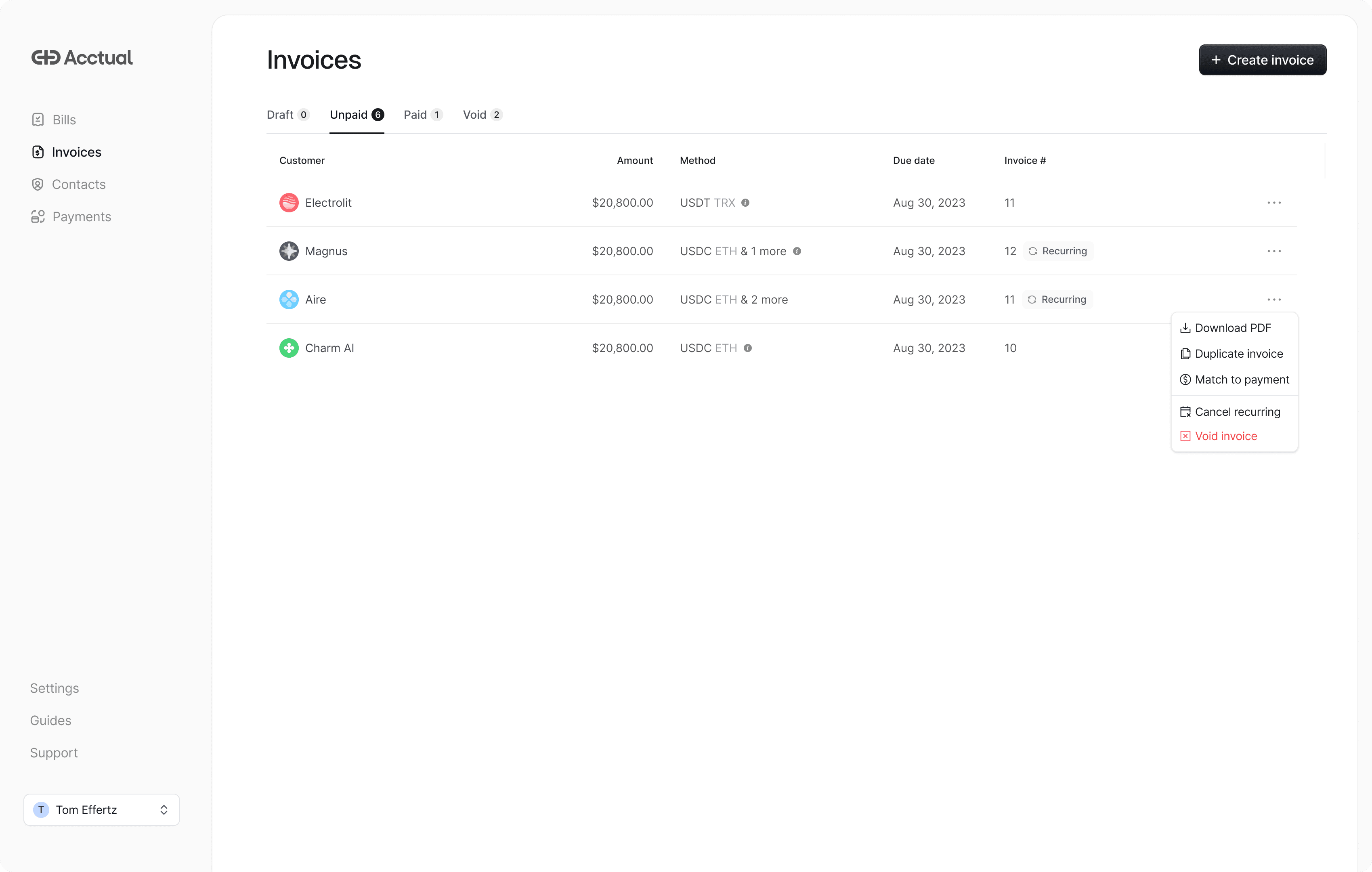
If you’ve already sent an invoice to a client and want to make it recurring, you don’t have to start over.
Find the invoice in your main invoice list.
Open the menu on the right and select “Make recurring.”
Choose the schedule you want.
That’s it. The system will now automatically send that invoice on the schedule you set.
Option 2: Create a new recurring invoice
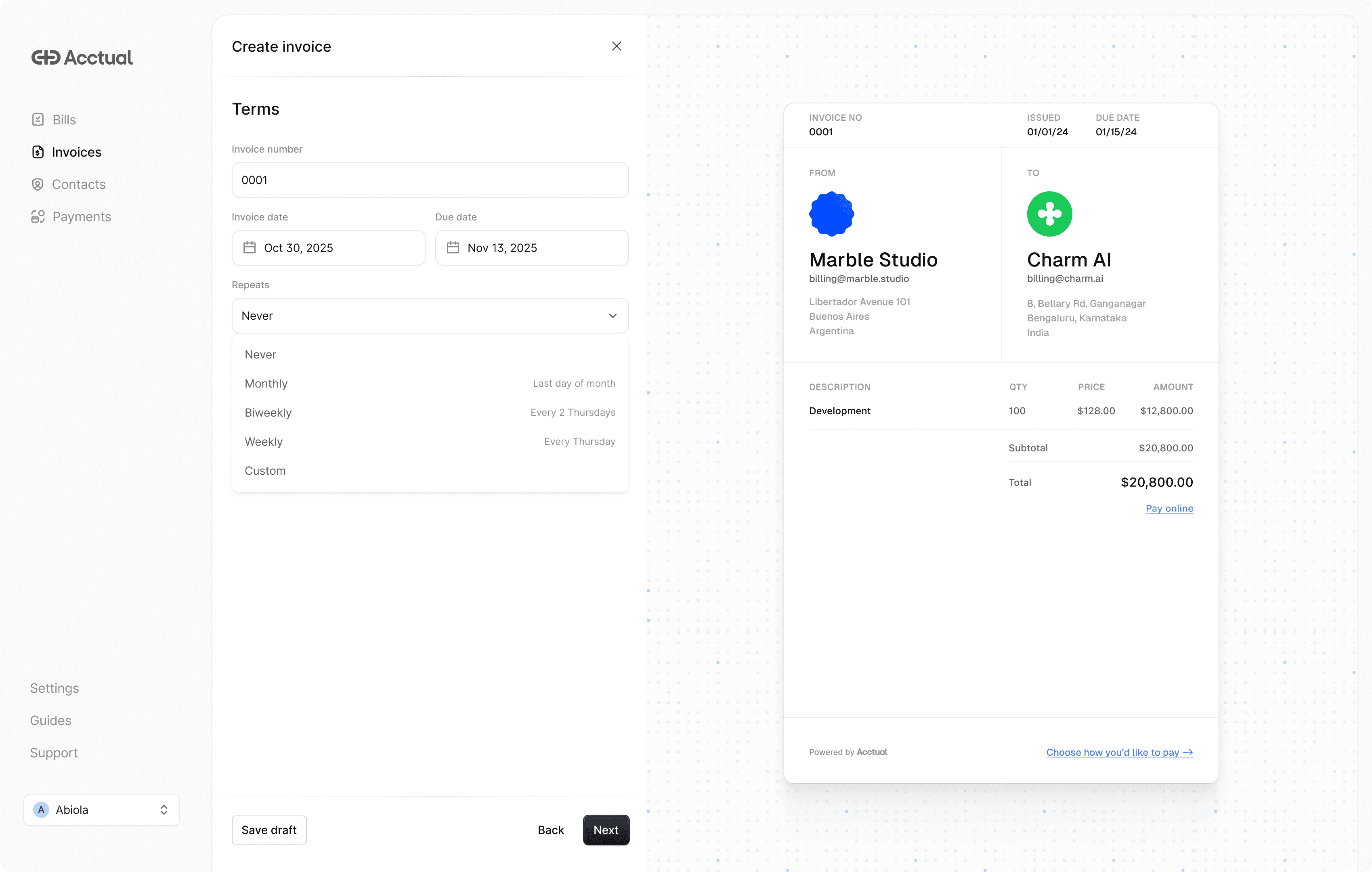
If you’re setting up a new client or a new retainer agreement:
Click “Create Invoice” to get started.
Fill in the customer details and line items.
In the “Terms” section, find the “Repeats” dropdown.
Set the schedule to Monthly, Weekly, Biweekly or Custom.
We also included an option to bill on the “last day of the month” when you select the Monthly schedule. You’ll see a preview of the upcoming invoice dates before you save, so you can be sure it’s correct.
How other invoicing tools work
When you use most invoicing tools, you expect your money to go straight to your bank. But that’s not always what happens. Many platforms are built on a model where they act as a middleman, holding your funds in their own accounts before passing them on to you.
When your client pays an invoice, the money first goes to the platform, not your bank account. It sits in what is essentially a holding account. The platform holds this money, sometimes for several days, before releasing it to you. This pool of money held by a platform is often called the “float.”
Platforms do this for a few reasons, but one is that they can earn interest on this float. It’s a business model built on delaying your access to your own money. For you, this means slower payouts and a harder time managing your cash flow. You can’t pay your vendors or cover your own expenses with money that’s stuck in someone else’s system.
On top of this, some platforms charge extra fees just for using their recurring invoice feature or for getting your money out. This is a separate fee from the standard credit card or ACH processing cost.
Here is a look at the fees, settlement times and crypto support for some common platforms:
Platform | Extra invoicing fee | Settlement time | Monthly subscription |
|---|---|---|---|
Acctual | None | Same or next day | None |
Stripe Billing | 0.7% on top of processing fees | 2 business days | None |
QuickBooks | None (but requires paid plan to access invoicing) | Up to 10+ days | From $30/month |
Mercury | None (but requires paid plan) | 1-2 business days | From $29.90/month |
Whop | 5% + $1.00 for instant payouts | Up to 14 business days | None |
Note: Fees and settlement times are based on publicly available information as of April 2026 and may vary. Whop offers instant crypto payouts for a 5% + $1.00 fee. This table does not include standard payment processing fees.
Who should use Acctual for recurring invoices?
Acctual is designed for freelancers, agencies and small businesses who want fast, flexible and global payments without the extra fees.
If you’ve ever had to wait for a payout to clear so you could pay your own bills, you’ll appreciate our same or next day settlement. If you work with international clients, you'll appreciate that clients in 160+ countries can pay by card, bank transfer or stablecoin.
And if you’re tired of paying extra fees just to send an invoice, you’ll appreciate our simple, transparent pricing.
How Acctual is different
We believe that when you get paid, the money should be yours. Fast. And your clients should be able to pay you in the way that works best for them, no matter where they are in the world.
Acctual is designed to give you same day payouts straight to your bank account, while giving your clients the flexibility to pay however they prefer. We support businesses and freelancers in over 160 countries.
For your clients: more ways to pay
Your clients can pay your invoices in a way that’s convenient for them. We support a variety of payment methods, including:
• Credit and debit cards
• Bank transfers (ACH in the US, SEPA in Europe)
• Wire transfers
• Stablecoins (USDC, USDT)
For you: get paid how you want
This is where Acctual is truly different. You don’t have to worry about how your client wants to pay. Your client picks their preferred method from the payment link. You get paid straight to your bank account. If your client pays in a different currency, we handle the conversion automatically.
When a client pays a recurring invoice, the funds are sent directly to your connected bank account or crypto wallet. We don’t put your money on hold. For example, if you invoice a client for $5,000 on a Monday, you’ll have the funds in your account by Tuesday. Not the following week.
This means:
No random holds: We don’t block your access to your funds with vague security reviews.
Fast, same day or next day payouts: You don’t have to wait for your money to clear.
No extra invoicing fees: We don’t charge you extra for sending a recurring invoice.
Your money goes where you want it: Funds go straight to your bank account. No platform holding your money.
It’s a simple principle: we automate the invoice, not how you get paid.
Benefits of automating recurring invoices
Beyond getting paid faster, setting up an automated billing system has other advantages:
Predictable cash flow: When you bill on a regular schedule, you have a clearer picture of your monthly revenue.
Fewer late payments: Automation means invoices go out on time, every time. You can also set up automatic payment reminders.
Less administrative work: Spend less time on paperwork and more time on the work that actually grows your business.
Improved client relationships: Your clients appreciate a professional and predictable billing process. There are no surprise invoices or awkward follow up emails.
Acctual also syncs every paid invoice with QuickBooks and Xero automatically. So when a recurring payment lands, it shows up in your books without manual data entry. That's less time reconciling at the end of the month and cleaner records at tax time.
Frequently asked questions
How do recurring invoices work?
You create an invoice template and set a schedule. On the scheduled dates, the system automatically generates a new invoice with the correct dates and sends it to your client. Your client can then pay it online.
Is this the same as subscription billing?
It’s very similar. Recurring invoices are a core part of any subscription billing model. You can use them to manage subscriptions for software, services or products.
Is this a good system for retainer invoicing?
Yes. This is a perfect way to handle retainer invoicing. You can set up a recurring invoice to bill your client for your retainer fee at the start of each month, ensuring you get paid on time for your ongoing work.
Available for all Acctual users
Recurring invoices are a core feature of Acctual and are available to all users today. There is no extra cost to use it.
If you’re ready to stop sending the same invoices every month, you can get started now.
How to set up recurring invoices
If you bill clients for the same amount on a regular schedule, you can automate that process in Acctual. This is a common way for freelancers and agencies to manage monthly retainers or subscription services without having to manually create and send an invoice each time.
This guide explains what recurring invoices are, how to set them up in Acctual and why it might be the best recurring invoice software for your business.
What are recurring invoices?
A recurring invoice is an invoice that is automatically generated and sent to a customer on a repeating schedule. The schedule can be weekly, monthly, yearly or any other regular interval.
This is different from a one time invoice, which is created and sent manually for a single project or sale.
What are recurring invoices used for?
Businesses use recurring invoices for any situation where they bill a client the same amount on a consistent basis. Common examples include:
Subscription services: Software as a Service (SaaS) products, monthly memberships or product subscriptions.
Retainer contracts: Agencies, consultants or lawyers who charge a fixed fee for ongoing services.
Web hosting and domain services: Companies that bill monthly or yearly for their services.
Property rentals: Landlords or property managers who collect rent payments.
Setting up a recurring billing system for these scenarios saves time and ensures you get paid on schedule.
How to set up recurring invoices in Acctual
We designed the process to be simple. You can start from an existing invoice or create a new one from scratch.
Option 1: Convert an existing invoice
If you’ve already sent an invoice to a client and want to make it recurring, you don’t have to start over.
Find the invoice in your main invoice list.
Open the menu on the right and select “Make recurring.”
Choose the schedule you want.
That’s it. The system will now automatically send that invoice on the schedule you set.
Option 2: Create a new recurring invoice
If you’re setting up a new client or a new retainer agreement:
Click “Create Invoice” to get started.
Fill in the customer details and line items.
In the “Terms” section, find the “Repeats” dropdown.
Set the schedule to Monthly, Weekly, Biweekly or Custom.
We also included an option to bill on the “last day of the month” when you select the Monthly schedule. You’ll see a preview of the upcoming invoice dates before you save, so you can be sure it’s correct.
How other invoicing tools work
When you use most invoicing tools, you expect your money to go straight to your bank. But that’s not always what happens. Many platforms are built on a model where they act as a middleman, holding your funds in their own accounts before passing them on to you.
When your client pays an invoice, the money first goes to the platform, not your bank account. It sits in what is essentially a holding account. The platform holds this money, sometimes for several days, before releasing it to you. This pool of money held by a platform is often called the “float.”
Platforms do this for a few reasons, but one is that they can earn interest on this float. It’s a business model built on delaying your access to your own money. For you, this means slower payouts and a harder time managing your cash flow. You can’t pay your vendors or cover your own expenses with money that’s stuck in someone else’s system.
On top of this, some platforms charge extra fees just for using their recurring invoice feature or for getting your money out. This is a separate fee from the standard credit card or ACH processing cost.
Here is a look at the fees, settlement times and crypto support for some common platforms:
Platform | Extra invoicing fee | Settlement time | Monthly subscription |
|---|---|---|---|
Acctual | None | Same or next day | None |
Stripe Billing | 0.7% on top of processing fees | 2 business days | None |
QuickBooks | None (but requires paid plan to access invoicing) | Up to 10+ days | From $30/month |
Mercury | None (but requires paid plan) | 1-2 business days | From $29.90/month |
Whop | 5% + $1.00 for instant payouts | Up to 14 business days | None |
Note: Fees and settlement times are based on publicly available information as of April 2026 and may vary. Whop offers instant crypto payouts for a 5% + $1.00 fee. This table does not include standard payment processing fees.
Who should use Acctual for recurring invoices?
Acctual is designed for freelancers, agencies and small businesses who want fast, flexible and global payments without the extra fees.
If you’ve ever had to wait for a payout to clear so you could pay your own bills, you’ll appreciate our same or next day settlement. If you work with international clients, you'll appreciate that clients in 160+ countries can pay by card, bank transfer or stablecoin.
And if you’re tired of paying extra fees just to send an invoice, you’ll appreciate our simple, transparent pricing.
How Acctual is different
We believe that when you get paid, the money should be yours. Fast. And your clients should be able to pay you in the way that works best for them, no matter where they are in the world.
Acctual is designed to give you same day payouts straight to your bank account, while giving your clients the flexibility to pay however they prefer. We support businesses and freelancers in over 160 countries.
For your clients: more ways to pay
Your clients can pay your invoices in a way that’s convenient for them. We support a variety of payment methods, including:
• Credit and debit cards
• Bank transfers (ACH in the US, SEPA in Europe)
• Wire transfers
• Stablecoins (USDC, USDT)
For you: get paid how you want
This is where Acctual is truly different. You don’t have to worry about how your client wants to pay. Your client picks their preferred method from the payment link. You get paid straight to your bank account. If your client pays in a different currency, we handle the conversion automatically.
When a client pays a recurring invoice, the funds are sent directly to your connected bank account or crypto wallet. We don’t put your money on hold. For example, if you invoice a client for $5,000 on a Monday, you’ll have the funds in your account by Tuesday. Not the following week.
This means:
No random holds: We don’t block your access to your funds with vague security reviews.
Fast, same day or next day payouts: You don’t have to wait for your money to clear.
No extra invoicing fees: We don’t charge you extra for sending a recurring invoice.
Your money goes where you want it: Funds go straight to your bank account. No platform holding your money.
It’s a simple principle: we automate the invoice, not how you get paid.
Benefits of automating recurring invoices
Beyond getting paid faster, setting up an automated billing system has other advantages:
Predictable cash flow: When you bill on a regular schedule, you have a clearer picture of your monthly revenue.
Fewer late payments: Automation means invoices go out on time, every time. You can also set up automatic payment reminders.
Less administrative work: Spend less time on paperwork and more time on the work that actually grows your business.
Improved client relationships: Your clients appreciate a professional and predictable billing process. There are no surprise invoices or awkward follow up emails.
Acctual also syncs every paid invoice with QuickBooks and Xero automatically. So when a recurring payment lands, it shows up in your books without manual data entry. That's less time reconciling at the end of the month and cleaner records at tax time.
Frequently asked questions
How do recurring invoices work?
You create an invoice template and set a schedule. On the scheduled dates, the system automatically generates a new invoice with the correct dates and sends it to your client. Your client can then pay it online.
Is this the same as subscription billing?
It’s very similar. Recurring invoices are a core part of any subscription billing model. You can use them to manage subscriptions for software, services or products.
Is this a good system for retainer invoicing?
Yes. This is a perfect way to handle retainer invoicing. You can set up a recurring invoice to bill your client for your retainer fee at the start of each month, ensuring you get paid on time for your ongoing work.
Available for all Acctual users
Recurring invoices are a core feature of Acctual and are available to all users today. There is no extra cost to use it.
If you’re ready to stop sending the same invoices every month, you can get started now.
Blog
Create the world’s most flexible invoice in seconds
With

from NYC
Guides
Invoice NO
0001

From
Marble Studio
billing@marble.studio

To
Charm AI
billing@charm.ai

Amount
$20,800.00
Due by
Sep 15, 2026
PAYMENT METHOD
Bank
Card
Crypto
Invoice NO
0001
From

Adria Studio
payments@adria.studio
To
Charm AI
billing@charm.ai
Amount
$20,800.00
Due by
Sep 15, 2026
Method

USDC via ETH/Solana
Invoice NO
0001
From
Marble Studio
billing@marble.studio
To

Acctual
payables@acctual.com
Amount
$20,800.00
Due by
Sep 15, 2026
PAYMENT METHOD
USDC via ETH/Solana
Create the world’s most flexible invoice in seconds
With
from NYC
Guides
Invoice NO
0001
From
Marble Studio
billing@marble.studio
To
Charm AI
billing@charm.ai
Amount
$20,800.00
Due by
Sep 15, 2026
PAYMENT METHOD
Bank
Card
Crypto
Invoice NO
0001
From
Adria Studio
payments@adria.studio
To
Charm AI
billing@charm.ai
Amount
$20,800.00
Due by
Sep 15, 2026
Method
USDC via ETH/Solana
Invoice NO
0001
From
Marble Studio
billing@marble.studio
To
Acctual
payables@acctual.com
Amount
$20,800.00
Due by
Sep 15, 2026
PAYMENT METHOD
USDC via ETH/Solana
Create the world’s most flexible invoice in seconds
With
from NYC
Guides